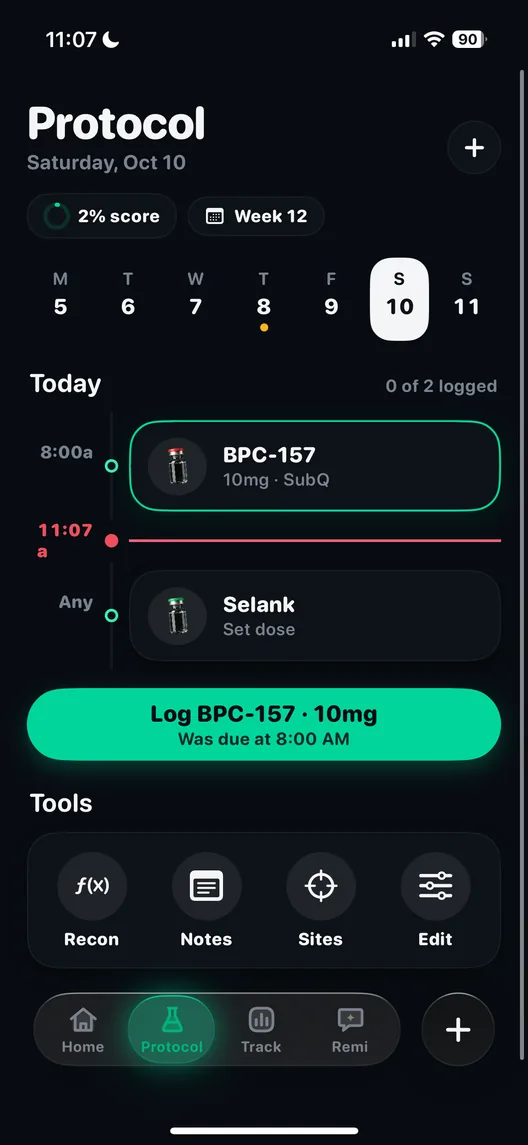
The protocol and stack planner
A protocol on paper is a list. A protocol in the app is a calendar that knows what is due today, reminds you when it is, and keeps count of the days you kept to it.
The protocol planner turns a plan into a schedule. You build a protocol with one compound or several, set how often each is taken and how the cycle runs, and the app lays it out as a calendar of what is due and when. Reminders fire for each dose. A streak counts the days you kept to it, and a daily check-in records how you felt alongside what you took.
How it works, step by step
- Add the compounds. Pick from the 57 in the library. A protocol can hold more than one, which is what most people mean by a stack.
- Set the frequency. Daily, several times a week or once weekly, per compound. A once-weekly GLP-1 receptor agonist and a daily compound can sit in the same protocol without either schedule overwriting the other.
- Set the cycle. Many protocols run in on and off phases. The planner holds the cycle length and sends reminders for the phase changes as well as the doses.
- Follow the calendar. Each day shows what is due. Confirming a dose writes it to the dose log with the time, amount, route and site.
- Check in. A short daily check-in records how you felt. Over weeks it becomes the line you compare against everything else.
Why reminders and schedules matter
Missing doses is normal, and it is the main way a protocol quietly turns into something else. The World Health Organization's report on long-term therapies put average adherence for chronic conditions in developed countries at about 50 percent. Reminders are one of the few interventions with decent trial evidence behind them.
| Study | Year | Journal | Design | n | Result |
|---|---|---|---|---|---|
| Thakkar et al. | 2016 | JAMA Internal Medicine | Meta-analysis of 16 randomised trials of text message reminders in chronic disease | 2,742 | Odds of adherence roughly doubled (OR 2.11, 95% CI 1.52 to 2.93). Median intervention 12 weeks; adherence mostly self-reported |
The caveats matter. Most of those trials measured adherence by asking people, and the median trial ran for 12 weeks. The reminders in them were text messages, not app notifications. What the result supports is the simple version: being prompted at the right time makes it more likely the dose happens. A calendar that already knows a weekly shot is due on Thursday is doing the same job.
Why titration schedules go wrong on paper
GLP-1 receptor agonists start low and step up. The semaglutide schedule for weight management, for example, runs 0.25 mg weekly for four weeks, then 0.5 mg, 1 mg and 1.7 mg before reaching 2.4 mg. Each step lasts at least four weeks, and the prescriber decides when to move. On a paper list it is easy to lose track of which week of which step you are in, which matters because the side effects tend to repeat at every increase. The titration glossary page and the side effects by week page explain the pattern. The planner holds the current step so the calendar is right without you counting weeks.
Streaks and the daily check-in
The streak is a count of consecutive days you kept to the protocol. It is a small thing and it works for the same reason a habit tracker works: a run you can see is a run you do not want to break. The community adds friend streaks on top, so a friend can see that you logged, never what.
The check-in is the more useful of the two over time. A one-line note on energy, sleep, appetite or side effects, made on the day, is what lets a change in week six be read against a change in protocol in week five.
Who it is for
- Anyone on a titrating GLP-1 who wants the current step and the next review date in one place.
- People running a stack of two or more compounds on different schedules.
- People who cycle compounds on and off and want the phase changes reminded, not remembered.
How it connects to the rest of the app
The planner decides what is due; the dose log records what happened. Doses drawn from a reconstituted vial count down in the vial tracker, and the site on each dose feeds the rotation map. Doses can be confirmed from the Apple Watch. Once a protocol has run for a few weeks, bloodwork and wearable data are drawn against it, and Remi can answer questions about it from your own log. The dose and the schedule are set by you and your prescriber; the app does not recommend either.
If you are starting a protocol, put it into the planner before the first dose rather than after the third, so the calendar, the reminders and the log line up from day one. The app is on the download page.
Questions people ask
Can I schedule more than one peptide at a time?
Yes. A protocol can contain several compounds, each with its own frequency, and the app combines them into one calendar of what is due.
Does the planner support cycles with time off?
Yes. You set the cycle, and the app sends reminders for on and off phases as well as for each dose.
Do dose reminders actually help?
The trial evidence says prompts help. A 2016 JAMA Internal Medicine meta-analysis of 16 randomised trials and 2,742 patients found text message reminders roughly doubled the odds of taking medicine as planned.
What is the streak?
A count of consecutive days you kept to the protocol. Friends can share streaks in the community, which shows that you logged but never what you logged.
Will the planner tell me what dose to use?
No. You enter the protocol your prescriber set. The app schedules and records it but does not recommend doses.
Sources
- Every feature, in depth, Peptide AI
- How it works, Peptide AI
- Peptide AI on the App Store, Apple App Store
- Mobile telephone text messaging for medication adherence in chronic disease: a meta-analysis, JAMA Internal Medicine, 2016
- Failure to take prescribed medicine for chronic diseases is a massive, world-wide problem, World Health Organization, 1 July 2003
- Wegovy prescribing information, Novo Nordisk