How to film UGC for a mobile app
App UGC is two pieces of footage stitched together: the screen, and you. Get both clean, open with something worth stopping for, and keep it vertical.
Filming an app is different from filming a product. There is nothing to unbox and no texture to show. What sells an app is seeing it do something real, quickly, in the hands of someone who uses it. That means a clean screen recording, a face or a voice that sounds like a real user, and a hook that earns the next three seconds.
Screen recording on iPhone
iOS has a built-in recorder. From Apple's instructions:
- Swipe down from the top-right corner to open Control Center.
- Tap the Record button and wait for the three-second countdown. If the button is not there, add it to Control Center first.
- Leave Control Center to start recording.
- To stop, tap the recording indicator at the top of the screen and tap Stop.
To capture your voice, press and hold the Record button in Control Center and turn the Microphone on before recording. The video saves to the Photos library. Apple notes that some apps do not allow recording.
Screen recording on Android
From Google's Android help:
- Swipe down twice from the top of the screen to open Quick Settings.
- Tap Screen record. If it is missing, edit Quick Settings to add it.
- Choose what to record, whether to include audio, and whether to show touches. Tap Start.
- Stop from the screen recorder notification.
Google notes some of these steps need Android 11 or later on Pixel phones. Menus differ by manufacturer.
Prepare the phone before you record
- Turn on Do Not Disturb so no notifications land mid-take.
- Charge it, and clear the status bar if you can.
- Use real data. An empty app looks like a demo. A few weeks of real logs look like use.
- Blur or crop anything private: names, emails, exact lab values you would rather not share.
- Plan the taps. Do the path three times before recording so there is no hunting for buttons.
- Show touches on Android if you want viewers to follow the taps.
Show the app in hand
Pure screen recordings can feel like a tutorial. Mix them with shots of the phone in your hand, filmed on a second phone or with the camera propped up. Common setups:
- Over the shoulder: camera behind you, phone screen visible, natural light from a window in front.
- Talking head with screen inset: you to camera, with the screen recording in a corner or cut in.
- Green screen style: you in front of the screen recording, pointing to what matters.
- In context: logging a meal at the table, a set at the gym, the morning check of sleep data in bed.
The in-context shot does the most work. It shows when and why someone opens the app.
Hooks
TikTok's creative guidance for performance ads says to introduce the content proposition in the first three seconds, and to prioritize the hook within the first six. Brands usually want several hooks per video so they can test them. Strong app hooks tend to be specific and personal:
- A result from your own data: "My sleep was worst on the nights I trained late. Here is the chart."
- A habit: "I have logged every workout for six months. This is what that looks like."
- A problem: "I had my training in one app, food in another and sleep in a third."
Avoid hooks that promise viewers a health outcome. They break the health and fitness ad rules and get rejected.
Specs and length
| Placement | Aspect ratio | Resolution | Length | File |
|---|---|---|---|---|
| TikTok In-Feed ads | 9:16 vertical recommended; 16:9 and 1:1 also accepted | At least 540 x 960 for vertical | Up to 10 minutes | 500 MB; .mp4, .mov and others |
| Instagram Reels ads | 9:16 | 1440 x 2560 recommended | 0 seconds to 15 minutes | 4 GB; MP4 or MOV |
TikTok's creative guidance also recommends shooting at 720p or higher. Meta asks that at least 14 percent of the top, 35 percent of the bottom and 6 percent on each side of a Reels ad stay free of text and logos, so the profile icon and buttons do not cover them. TikTok publishes downloadable safe zone templates for the same reason. Long maximums do not mean long videos: most UGC briefs ask for 15 to 60 seconds.
Captions and text
Many people watch with the sound off, so add captions. TikTok recommends 5 to 10 words per second when using on-screen text. Keep captions inside the safe zone. Put any required disclosure on screen as well as saying it, as the FTC disclosure guide explains.
Light
- Face a window. Soft daylight from the front is the cheapest good light there is.
- Avoid a bright window behind you. It turns your face into a silhouette.
- When you film the phone with a second camera, tilt the screen slightly away from the light to cut glare.
- If you use a ring light, keep it off-center so it does not reflect in the phone screen.
Audio
- Record in a small room with soft furnishings. Bare walls echo.
- Turn off fans and air conditioning while you record.
- A clip-on microphone is the single best upgrade once you are being paid.
- Do a ten-second test and listen on headphones before the full take.
TikTok also recommends using sound or music. If the brand plans to run the video as an ad, check whether it wants music added by you or left out so its editor can license its own.
A simple shot list for a tracking app
- Hook to camera, three seconds.
- In-context shot of logging something real.
- Screen recording of the timeline or chart that results.
- Back to camera: what you look at each week and why.
- Close: what the app is, a disclosure, and the brand's call to action.
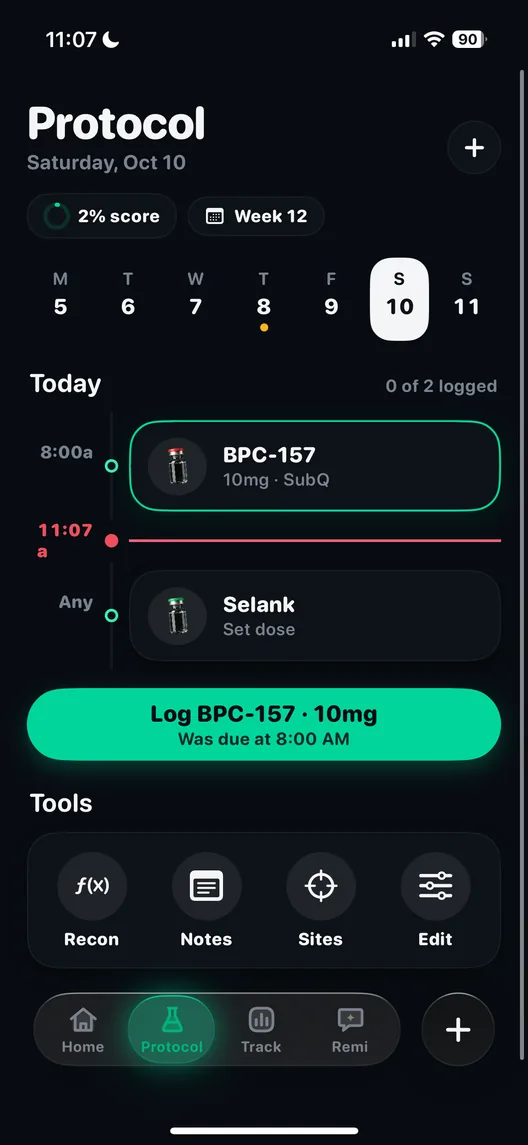
That structure fits Peptide AI well, since the app puts doses, meals, workouts, labs, wearable data and body scans on one timeline. Read creating for Peptide AI for what to film and avoid, and apply to create for Peptide AI when you have samples. More basics are on how to become a UGC creator and the portfolio guide.
Questions people ask
How do I screen record on iPhone with my voice?
Open Control Center, press and hold the Record button, turn the Microphone on, then tap Record. The recording saves to Photos.
How do I screen record on Android?
Swipe down twice to open Quick Settings, tap Screen record, choose whether to include audio and show touches, and tap Start. Some steps need Android 11 or later on Pixel phones.
What aspect ratio should app UGC be?
Vertical 9:16. TikTok recommends it for In-Feed ads and Meta specifies 9:16 for Instagram Reels ads.
How long should a UGC video for an app be?
Most briefs ask for 15 to 60 seconds. TikTok allows up to 10 minutes and Reels ads up to 15, but the product proposition should land in the first three seconds.
What is the Reels safe zone?
Meta asks that at least 14 percent of the top, 35 percent of the bottom and 6 percent of each side stay free of text and logos.
Sources
- Record the screen on your iPhone, iPad or iPod touch, Apple Support
- Take a screenshot or record your screen on your Android device, Android Help, Google
- TikTok Auction In-Feed Ads, TikTok Ads Manager help
- Creative best practices for performance ads, TikTok Ads Manager help
- Instagram Reels ads: video specifications, Meta Ads Guide
- Disclosures 101 for Social Media Influencers, U.S. Federal Trade Commission, November 2019